
|
Shortcut Menu Shell Extensions are
used to add custom menu items to file's pop-up menus. Use TSxContextMenu
to add this feature to your application.
The Shortcut Menu handler is an
ActiveX library like all other Shell Extensions. The first step to do
is to create a new ActiveX Library. Create it with the following sequence
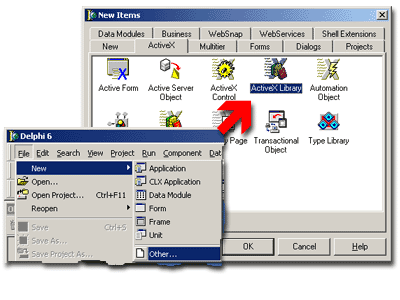
of operations: open the Repository dialog using File | New | Other...
menu, then select the ActiveX tab and click the ActiveX Library icon.

Fig. 1. New ActiveX Library creation.
Save the created project.
The next step is to add the instance of TSxDataModule
to the project. Every Shell+ component should be placed on SxDataModule
1. This special descendant of TDataModule
supplies several internal methods that allow Shell+ components to safely
operates in multiple Shell threads and automates their registration and
initialization. Note that you can place several Shell+ components onto
the same SxDataModule as well as you can add multiple TSxDataModule instances
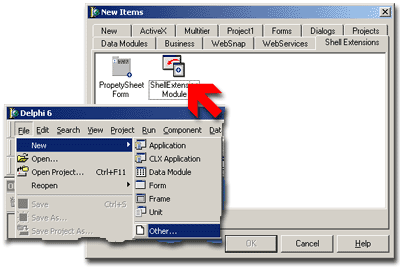
to your project. It is easy to add new SxDataModule to the project - just
click corresponding icon in the Repository:

Fig. 2. How to create new SxDataModule instance.
You can save the project now.
 |
Add the TSxContextMenu
now. This component automates the menu drawing and allows you to forget
about communication with Shell. This component uses TSxPopupMenu
which is simply standard Delphi's TPopupMenu component ancestor.
In the TsxPopupMenu you can specify the menu items by simple and know
way - using standard Menu Editor. So add the TSxPopupMenu to the module
and set the TSxContextMenu.ContextMenu property to it. |
Look on the properties of TSxContextMenu
component:
| Property Name |
Description |
|
CLSID
|
Automatically generated GUID. All shell extensions
use it to be identified by system.
|
|
ContextMenu
|
TSxPopupMenu reference. This component will
be used in its usual manner - it holds menu items to be displayed.
Unlike the ordinary application these menu items will be displayed
in the shell's shortcut menu, not application menu. Use TSxPopupMenu
designer to edit menu items as you do it usually.
|
|
Description
|
Extension description, enter desired text here.
|
|
ExtensionName
|
Short name of the extension, MyContextMenu for example.
|
|
FileType
|
File type to be handled by the extension. The extended
menu items will be shown for this file type only. This example uses
the "txtfile" file type, it includes most of text files
such as txt, ini, log and many other.
|
|
Name
|
An ordinary name of the Delphi component.
|
Table 1. TSxContextMenu component properties
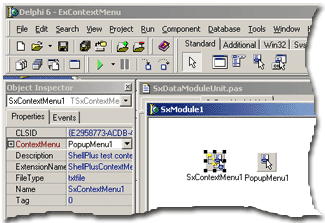
Set component properties as shown
below:

Fig 3. TSxContextMenu properties sample
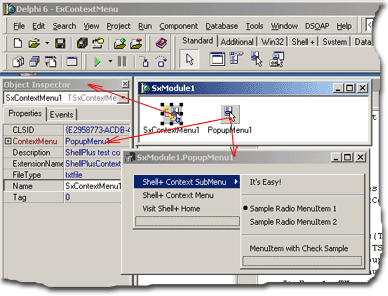
The next step is to design the
menu. Do it as usual with native TPopupMenu designer.

Save the project and compile it
- it is ready now! As well as any other ActiveX library the Shell+ project
requires registration. You can register it in several ways:
- from command prompt using MS regsvr32 utility: regsvr32.exe Project1.dll
- from command prompt using Borland's tregsvr utility: tregsvr Project1.dll
To know more about shell extension installation please follow
the link.
The final step is to test the extension library. Create
the new text document on the desktop or in any folder. You can use the
New | Text Document context menu for this purpose. Right click the newly
created file. You should see several new menu items in it:

Don't forget to uninstall the example
when all tests are finished. Note that it is an example only and it will
show its confirmation window until you will not unregister it. As well
as installation the uninstallation can be done in many ways:
- from command prompt using MS regsvr32 utility: regsvr32.exe /u Project1.dll
- from command prompt using Borland's tregsvr utility: tregsvr -u Project1.dll
The detailed information about extension uninstallation
is available here.
Use
links below to download source codes of this example as well as binary
files:
| Description and files |
|
This example will add custom items to standard menu for text files.
Read more...
|
| ContextMenu-D5.zip , 4/4/2007, 211Kb | | ContextMenu-D6.zip , 4/4/2007, 246Kb |
| ContextMenu-D7.zip , 1/7/2007, 252Kb | | ContextMenu-D9.zip , 2/23/2008, 258Kb |
| ContextMenu-D10.zip , 4/4/2007, 264Kb |
Top
|