 |
Customer login |
 |
 |
     |
 |
 |
|
|||
|
|||
|
|  |
We are glad to announce the release of version 3.2. This article describes the features introduced in releases starting from 3.1. For examples we used code from our standard examples as well as from our end-user product, which Windows Shell-part is completely built using Shell+ components - Romeo Burner.
Delphi 2007 support Version 3.2 introduces support for CodeGear Delphi 2007. Many people asking about implementing shell extensions for Windows x64. Unfortunately this will be possible only with Delphi x64 (CodeGear planned to release it at the end of 2008). Windows x64 can simulate 32-bit operating system for standalone applications, but shell extensions are DLL and 32-bit DLL can't work inside of 64-bit process.
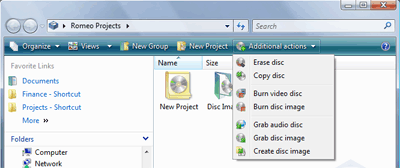
Windows Vista Support Starting from version 3.1 we provide support Windows Vista and it's new features such as Command Bar, various icon sizes and background. CommandBar element in Windows Vista replaces old-styled toolbar. With Shell+ Command Bar items can be added for virtual folders of namespace extension. Here is the example how Command Bar looks in Romeo:
CommandBar implemented using TsxExplorerCommandsModule component. It's Commands property contain information about items and subitems of Command Bar. Every item is linked with MenuItem (from TsxPopupMenu component), so everything works just like TsxExplorerToolbar or TsxExplorerMenu components. You can handle OnUpdateExplorerCommands or OnUpdateItemState (event of CommandBar item) to update visibility and state of any item in the CommandBar. For some reason Microsoft implemented CommandBar such way that its icons can be loaded only from resources or external file. Shell+ provides a bit flexibility. You can assign icon to the CommandBar item. It will be stored in DFM resource and automatically stored to temporary file and loaded in runtime. This is the simpliest way to develop this functionality. In Romeo we stored all icons in resource file linked to the project and loaded icons by handling OnGetIconResName event of CommandBar item. It's DllFileName property shall receive path to the DLL with resources and index of icon resource within that DLL. The TsxExplorerCommandsModule must be connected to ShellView component using CommandsModule property.
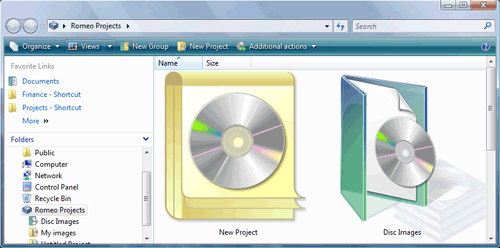
Windows Vista introduces wide range of shell views and new icon size - Jumbo (256x256):
To provide support for various icon sizes we added property Icons to DataProvider component. This property contains list of TsxIconList components filled with icons of different sizes. They must have synchronious indexes and image counts.
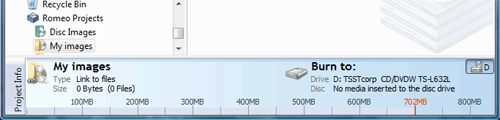
To make your software look similar with Windows Vista we implemented automatic background fill for Explorer Band objects:
To make your Explorer Band look seamless with Windows Vista just turn on DrawVistaBg property in Options property of TsxExplorerBand component.
Unicode support Shell+ 3.1 also introduced support for Unicode. Any information displayed within Windows Shell can be unicode. To keep backward compatibility we added unicode alternatives to all methods in Shell+ that work with strings. These methods have "W" letter at the end of it's name. For example: OnShellExtInitW. Utility functions and classes with unicode support are collected in unit SxUnicode. Here is the list of them:
Show or Hide desktop icon of NSE With version 3.2 component TsxVirtualFolder got new property - DesktopIconVisible. It is used to show/hide icon on the Windows Desktop without unregistering the shell extension. Often user doesn't like to see something else than Recycle Bin on their desktop.
New ShellView runtime properties TsxSysShellView also got two new properties: SelectedGrain and SelectedGrainList. They are very useful in events like TsxExplorerToolbar.OnUpdateToolbar. By checking these properties you can decide whether to enable, disable, hide or show some specific buttons or CommandBar items.
File transfer memory optimization TsxByHandProvider have got new useful event: OnGetGrainFileContentsEx. It provides you a structure TGrainFileContents with different kinds of stream objects to work with.
Drop-down buttons for Explorer Toolbar Starting from version 3.2 TsxExplorerToolBar component supports drop-down buttons. This can be easily done by adding subitems to the menu item that assigned to the Explorer Button object (TsxExplorerToolbar.Buttons property). |
|
Components
| Download | Purchase
| Support | About
Us
Copyright © 2016 ALDYN Software. All rights reserved. Copyright © 2001 - 2011 Shell+ Development Group. All rights reserved. |